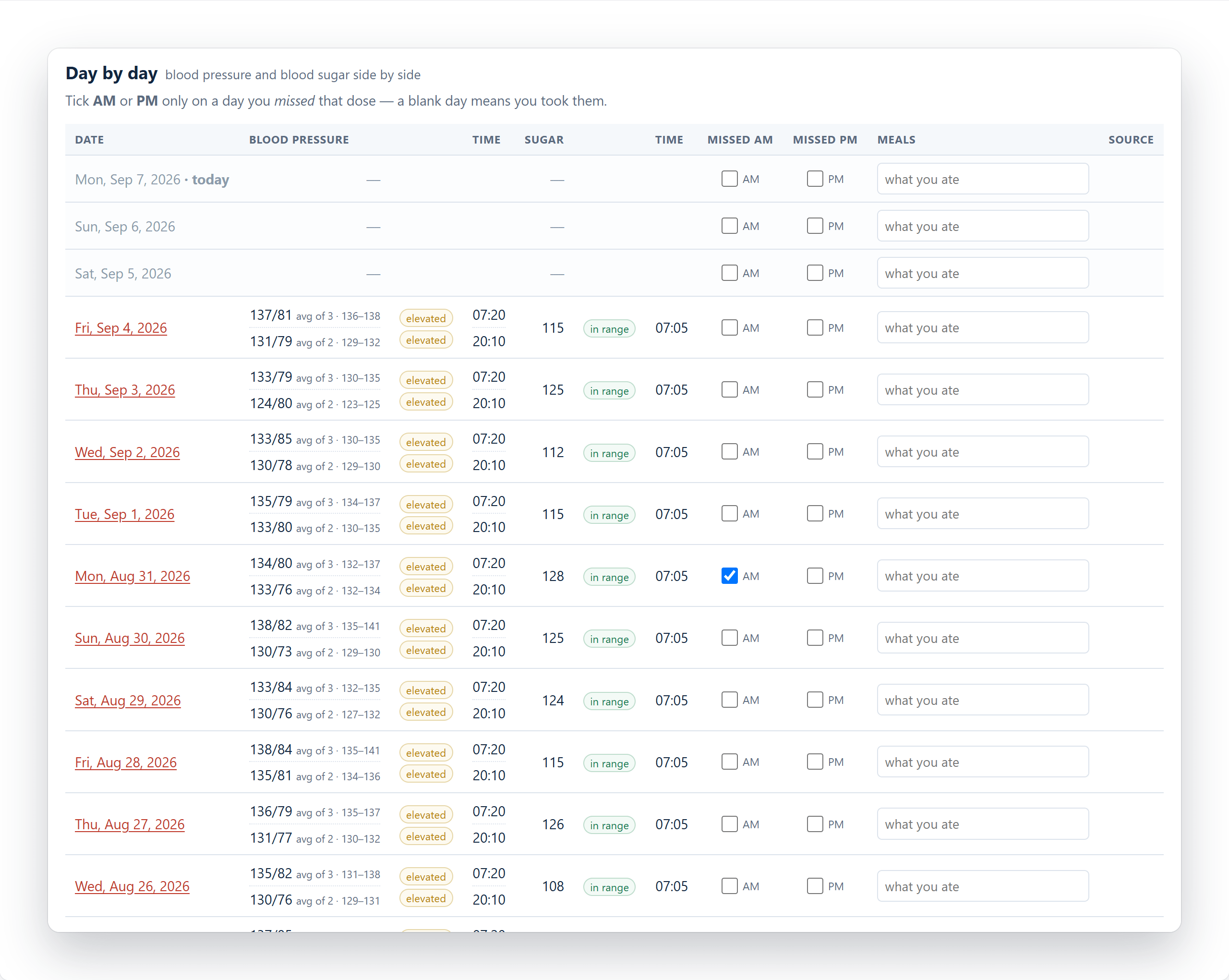
Vitals keeps blood pressure, blood sugar and weight in one record, on your own device. It reads the export your monitor or meter already produces and turns it into something you can hand to a doctor without explaining it first. There is no account to create and no server involved: your readings never leave the phone or computer you entered them on.
$19.95 — one payment, not a subscription
Free for 30 Days
No card and no account to try it. Buy it once when you are ready — there is nothing to renew and nothing to cancel.

Why three readings, and why that matters
Clinics take more than one reading and average them, because a single number is noisy — the first is usually the highest, and nerves, posture and timing all move it. Home monitors mostly do not do this. Many have no averaging at all, so whatever appears on the display is what gets written down.
Vitals treats readings taken close together as one sitting and averages them. Take three a minute or two apart and you get one honest number for that moment, alongside the individual readings if you want to look. Your daily chart then plots what actually happened rather than whichever reading you happened to record first.
If your monitor does average on the device, nothing is lost — a single reading is simply a sitting of one.
Weight, and the BMI your records expect
Weight is tracked alongside the other two, and a single morning’s figure is never presented as if it meant something. A day’s weight swings two to four pounds on its own — water, food still going through you, the time of day, what you are wearing. So every weight figure on the report is a seven-day average, and the chart draws faint dots for what the scale actually said with a solid line for the average through them. Nothing is hidden; the average is simply the figure that can be compared with last month’s.
You choose how far back the report compares you against. Make it the gap between your appointments, so the change it shows is the change since your doctor last saw you.
Give it your height once and it works out your BMI. That figure is there for one reason: it is on nearly every medical record, so a surgery notices when it is missing. It is a rough number and the app says so — it cannot tell muscle from fat, and the pounds and the percentage above it are the more useful figures. Your height is also what places the two guide lines on the weight chart, at the weights where your own BMI would reach 25 and 30. Pounds or kilograms, feet and inches or centimetres, whichever you already think in.
When a reading has a reason behind it
Some days the number is high and you already know why. You can put a small flag on that day with a few words of your own, and it appears on the blood sugar chart as a pennant just above that day’s highest reading — pointing at the spike it explains, rather than at the day in general.
The flag goes where the doctor will see it. It is drawn on the blood sugar chart itself, so it is there on the printed report, beside the spike it explains. The emailed summary goes further and itemises every flagged day with your wording in full, under a heading that says plainly these are the patient’s notes rather than measurements.
Two things it deliberately will not do. It stays off the blood pressure chart, because the claim being made is about sugar and drawing it elsewhere would invite reading an effect nobody suggested. And it never hands over your food diary: you can keep notes on what you ate for your own use, and those stay on your device. What reaches the doctor is the flag and the words you chose for it — enough to explain a spike, without turning your record into a list of meals.
What your doctor receives
The Doctor’s report is a printable page covering the range you are looking at: blood pressure and blood sugar charted over time, the sitting averages, and the readings behind them. Print it, or save it as a PDF and attach it to an email — it is designed to be read by someone who has never seen the app.
Email my doctor is the quicker version. It writes a plain-text summary of the range on screen and hands it to your own mail app, with the doctor’s address filled in if you have saved one. You see the exact text before it sends. Blood sugar is written in your own units while being compared against clinical ranges, so nothing is mistranslated on the way.
Every report and email carries a plain statement that the readings are self-reported and uncalibrated. That is not a disclaimer buried in a settings page — it travels with the only document that leaves the house.
Getting your history in
If you already track readings, they come across without retyping. Vitals reads the CSV exports from OMRON blood pressure monitors and from mySugr, including several months at a time, and skips anything already recorded so importing the same file twice cannot duplicate your history.
You can also just type readings in. Adding one takes a few seconds, and the date and time default to now.
It stays on your device
There is no account, no login and no server. Vitals never transmits your readings anywhere — not for backup, not for analytics, not for anything. That is a deliberate design decision, not a feature waiting to be added, and it is why the app can be honest about medical data in a way a cloud service cannot.
Buying it does not change that. The purchase produces a license key, which you paste in once. The app checks that key with Lemon Squeezy, who handle the payment, and remembers the answer on your device. That single exchange carries the key and nothing else — no readings, no name, no email, no information about your device. There is still nothing to log in to, and still no server of ours for your readings to sit on.
The practical consequence is that backups are yours to hold. One button writes a file you keep — on the device, in your own cloud drive, wherever you like. The app watches for real risk rather than nagging on a timer: it prompts when readings have accumulated since the last backup that genuinely worked, and tells you how many would be lost. Restoring puts them back, and you can merge into what is there or replace it.
It also works with no connection at all. Once opened, Vitals runs offline — useful in a waiting room with no signal — and tells you when a new version is ready rather than leaving you on an old one.
What it deliberately will not do
Vitals does not interpret your readings. No trend projections, no correlating a missed dose against a number, no traffic-light verdicts, no advice. The data a home monitor produces cannot support conclusions like that, and the moment an app starts drawing them it stops being a record and becomes something else entirely.
BMI is the one figure it works out for you, and it is there because medical records expect it rather than because it is insightful — the app calls it rough in its own help, and the bands it uses are the standard clinical ones rather than a verdict about you. A flag you put on a day is the same kind of thing: it records what you believe, dated and in your words, and leaves the reading of it to the person qualified to do that.
There are no pill reminders either. You can mark a dose as missed, and that mark appears on the chart as a mark — for your eye, and your doctor’s, to make of what they will.
Who it’s for
Anyone tracking blood pressure, blood sugar, or both — for themselves or for someone they care for — who wants an accurate record to take to an appointment rather than an app with opinions. It suits people who have been told to “keep an eye on it” and want the eye to be a reliable one, and anyone who would rather their medical history did not live on somebody else’s server.